What Is an AI Employee? How It Works, What It Does and What It Costs
An AI employee answers customers, qualifies leads, books meetings and hands over to a person. How it works, what it costs and how it differs from a chatbot.
An AI employee is AI that does a defined job in your customer conversations. It answers questions, qualifies leads, books meetings and hands the conversation to a person when judgment is needed. Unlike a chatbot, it works toward an outcome your team sets. Unlike an AI avatar video, it talks live.
This guide explains what an AI employee is, how it differs from chatbots, AI avatars and AI agents, what it does in a normal working day, where it should stop, and what it costs.
AI employee: a short definition
Think of a job description, not a tool. A good employee has a role, knows the company's material, follows rules about what they may promise and passes difficult cases to a colleague. An AI employee works the same way:
- Role: sales, reception, support, meetings or recruiting.
- Knowledge: your website pages, documents and FAQs, approved by you.
- Outcome: a booked call, a qualified lead or a resolved question.
- Boundaries: topics it never handles and the moment a person takes over.
- Memory: the context of earlier conversations with the same customer.
If one of these is missing, you have a chatbot or a demo, not an employee.
AI employee vs chatbot, AI avatar and AI agent
The names overlap, so here is how they differ in practice.
| Type | What it is | What it does | Where it stops |
|---|---|---|---|
| Chatbot | A text widget with scripted or generated replies | Answers common questions | Rarely qualifies, books or follows up. No voice or face. |
| AI avatar video | A synthetic presenter in a recorded video | Reads a script you wrote | Cannot hear or answer the viewer. |
| AI notetaker | A bot that records your meetings | Writes summaries and action items | Does not speak or act for you. |
| AI agent | Software that completes tasks through other apps | Automates back-office work | Usually built by developers and rarely faces customers. |
| AI employee | A configured role that talks to your customers | Answers, qualifies, books, follows up and hands over | Needs your approved knowledge and clear rules. |
Lilidi Twin is an AI employee. It talks by video, voice or text, so a customer can see a face, hear a voice or simply type. For a longer comparison with video tools, read Lilidi Twin vs HeyGen, Tavus and Synthesia.
What an AI employee does in a working day
Most teams start with one role and add others later. These six come up most often:
- Sales: answers pricing and product questions, asks the qualifying questions your team would ask and books a call with the right person.
- Reception: greets visitors of a clinic, salon, studio or agency, explains services and offers free appointment times.
- Support: answers from your help pages and policies, and passes anything sensitive to a person with the full context.
- Meetings: joins a Zoom, Google Meet or Microsoft Teams call to present, answer questions or take notes, then drafts a recap.
- Founder: speaks for a busy founder with investors, partners and press, sends the deck and books a call.
- HR: answers candidates' questions about a role, collects the basics and schedules interviews.
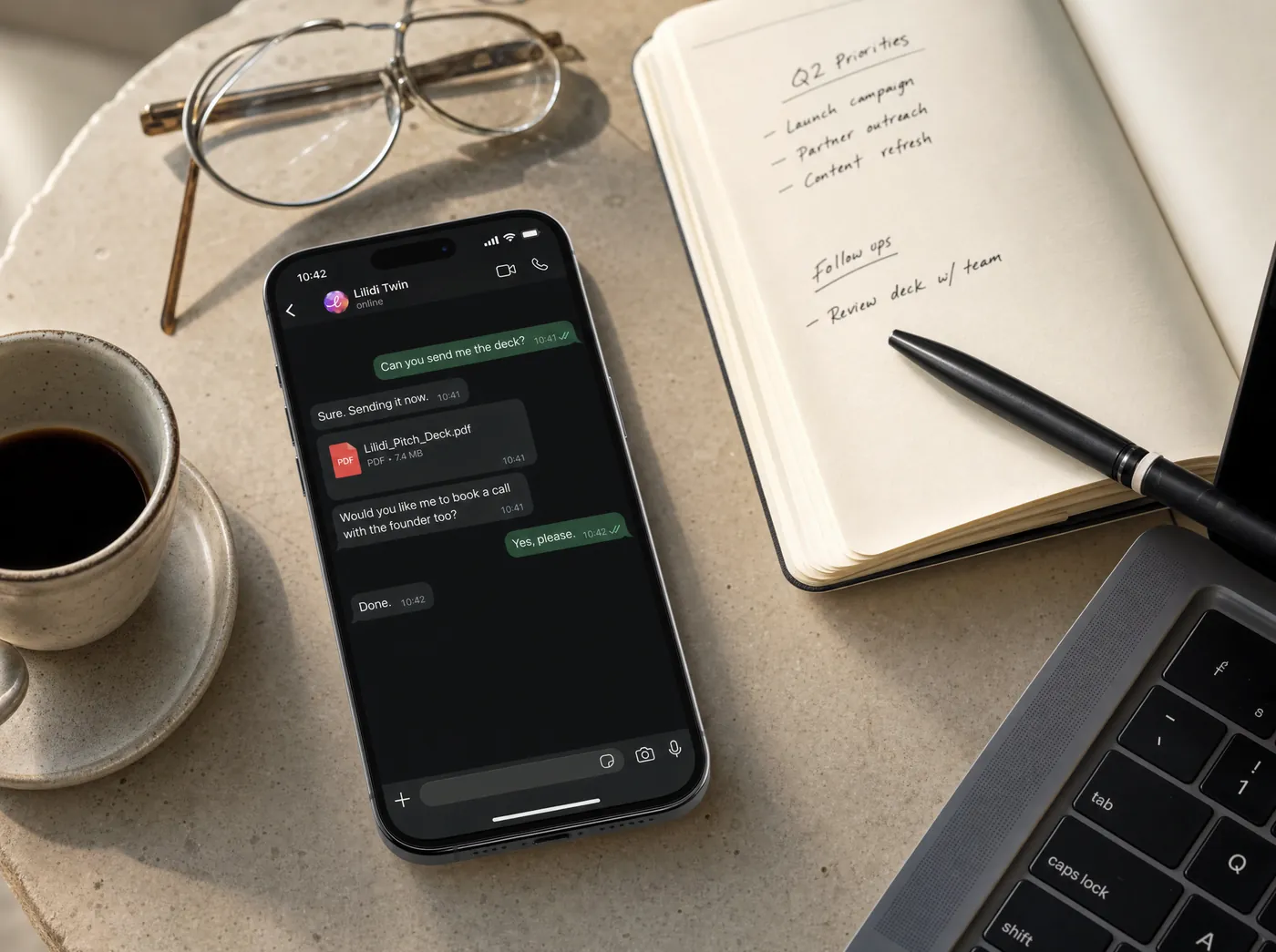
Full example conversations for each role are on the use cases page.
Where an AI employee works
- On your website, as a video, voice or text window.
- Through a shared link in your emails, ads or social bios.
- In WhatsApp, where many customers already write.
- In online meetings on Zoom, Google Meet and Microsoft Teams.
It speaks more than 30 languages and answers in the customer's language. Bookings go into Google Calendar or Calendly, and follow-ups go out through Gmail.

How an AI employee works, step by step
- The customer asks a question on your site, in WhatsApp or in a call.
- The AI employee works out what they need, in their language.
- It answers only from the knowledge you approved.
- It asks the questions your team would ask to qualify the request.
- It acts: books the call or sends the right document or link.
- It remembers the context for the next conversation.
- A person takes over when judgment is needed, with the whole conversation in front of them.
Setting one up follows the same logic. You give it your website and documents, approve what it may use, choose the role and the outcome, pick a face and a voice, set the boundaries, test it the way a customer would and publish. The how it works page walks through each step.
What an AI employee should not do
A good AI employee is honest about what it is and where it stops.
- It introduces itself as AI. Customers should never have to guess.
- It does not invent answers. If something is not in the approved knowledge, it says so and offers a person.
- It does not negotiate discounts, sign contracts or handle sensitive cases on its own. Those go to a person.
- It does not replace your team. It takes the first line, so people spend their time on the conversations that need them.
What an AI employee costs
A person in a first-line role costs a salary, training and cover for evenings and weekends. An AI employee is priced by the minutes it spends in conversation. Lilidi Twin starts at $19 a month for 60 minutes. Starter is $59 for 175 minutes, Professional $179 for 500 minutes and Business $499 for 1,500 minutes. Extra minutes cost $0.39, annual billing saves 20%, and a personal voice clone comes with Professional and above. Details are on the pricing page.
How to start with an AI employee
- Pick one role where conversations repeat: pricing questions, appointment requests or first calls.
- Collect the material your best person uses: website pages, pricing, FAQs and policies.
- Write down what a good conversation ends with and when a person must take over.
- Build the AI employee, test it with the hardest questions you get and fix the gaps.
- Put it where customers already are: your site, WhatsApp or your meeting links.
With Lilidi Twin you start from a link to your website. See what Lilidi Twin does or choose a plan.
Questions people ask about AI employees
What is an AI employee?
Is an AI employee the same as a chatbot?
Can an AI employee join Zoom or Google Meet calls?
Will customers know they are talking to AI?
How much does an AI employee cost?
Do I need developers to set one up?

Founder & CEO, Lilidi AI
Continue reading
AI Receptionist for Your Website: How It Works, What It Costs and Who It Fits
An AI receptionist for your website greets visitors, answers questions, books appointments and hands over to your team. How it works and what it costs.
Send Your AI Twin to a Zoom or Google Meet Call: How It Works and When It Makes Sense
An AI twin joins Zoom, Google Meet or Teams calls, answers from your approved knowledge and drafts the follow-up. How it works and when to go yourself.
AI Sales Rep for Your Website: Answer, Qualify and Book Every Inbound Lead
An AI sales rep on your website answers pricing questions, qualifies inbound leads and books calls, day or night. How it works and how to measure it.
Meet Lilidi Twin, an AI employee for customer conversations
It talks with your website visitors by video, voice or text, qualifies leads, books meetings and joins Zoom, Google Meet and Microsoft Teams calls.